Claims management software has one job: move the claim without losing the facts. Simple sentence. Very funny industry. (Everyone has a PDF, everyone has a deadline, and somehow the important file is called final-final-v3.pdf.)
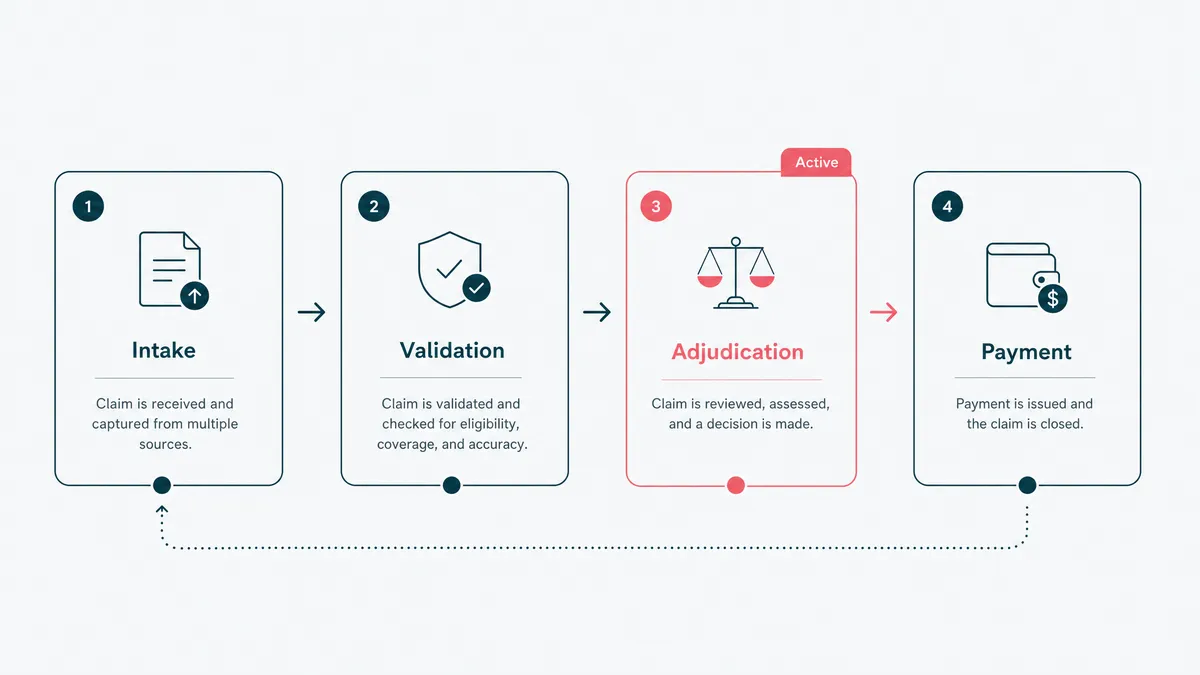
Claims management software is the system insurers use to move a claim from first notice of loss to investigation, approval, payment, and reporting. It should handle documents, tasks, decisions, integrations, and audit trails in one workflow. If it only stores claim data, it is a filing cabinet with better login screens.
We build workflow and integration software, so this is not a neutral encyclopedia entry. Here is the useful buyer version: what claims software should do, what to buy, what to build, and where AI helps without pretending it is the adjuster.
Claims management software moves the whole lifecycle
A claim is not a form submission. It is a chain of decisions.
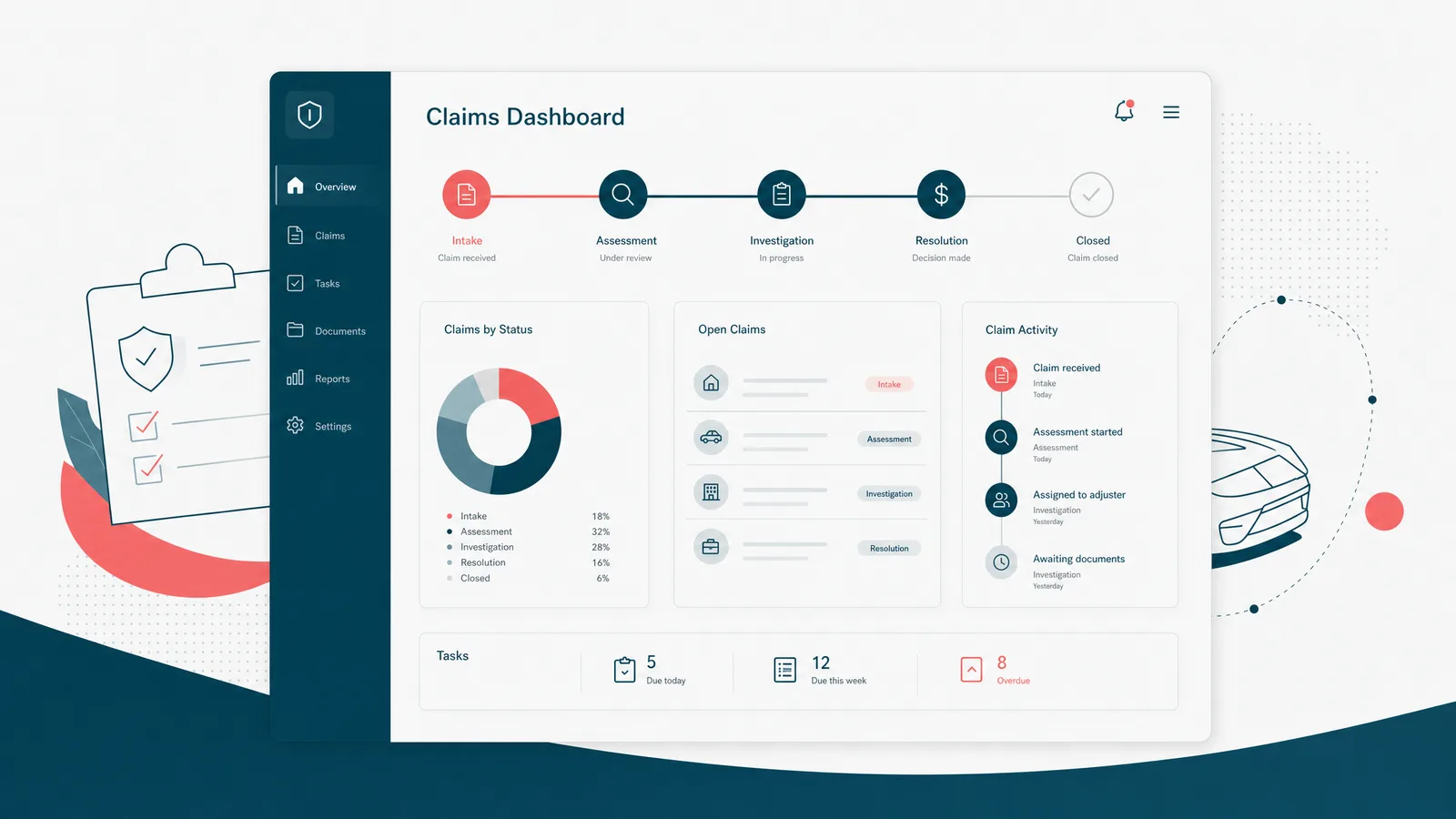
First notice of loss arrives. The system checks coverage, collects documents, assigns work, requests missing information, routes approvals, calculates reserves, hands payment to the finance layer, and keeps the customer informed. Then someone asks why a decision was made three months later, and the system needs to answer without shrugging.
That last part matters. Claims are operational work, but they are also evidence. A good claims management system tells you what happened, who changed it, when, and why. Without that, the team is left reading email archaeology. Indiana Jones had more fun.
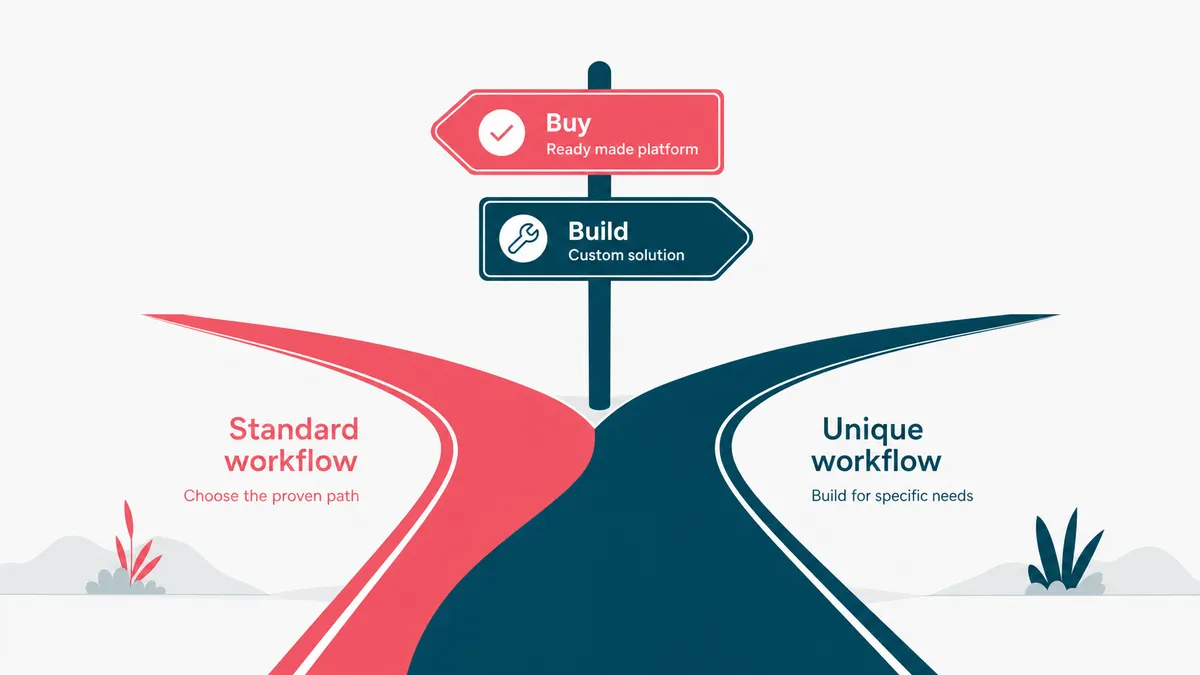
Buy the platform when the workflow is standard
Most insurers should start by looking at established claims platforms. If a product covers your claim types, roles, reporting, and compliance rules, buy it. Configuration beats custom code when the workflow is not unique.
This is the unglamorous answer, but it saves money. A standard platform has already paid for years of edge cases: duplicate documents, reserve changes, supervisor approvals, re-opened claims, missed fields, permission rules, and reports regulators enjoy asking for at precisely the wrong time.
Custom starts to make sense when the standard system bends the operation around itself. Maybe the claim touches unusual data. Maybe a legacy policy admin system sits in the middle like a grumpy bridge troll. Maybe staff are copying the same facts into the claims platform, the CRM, and the payment system because none of them agree on the claim identity. That is business process automation territory, not a prettier claims screen.
That is where insurance software development earns its keep: not by rebuilding every screen, but by fixing the workflow the products cannot.
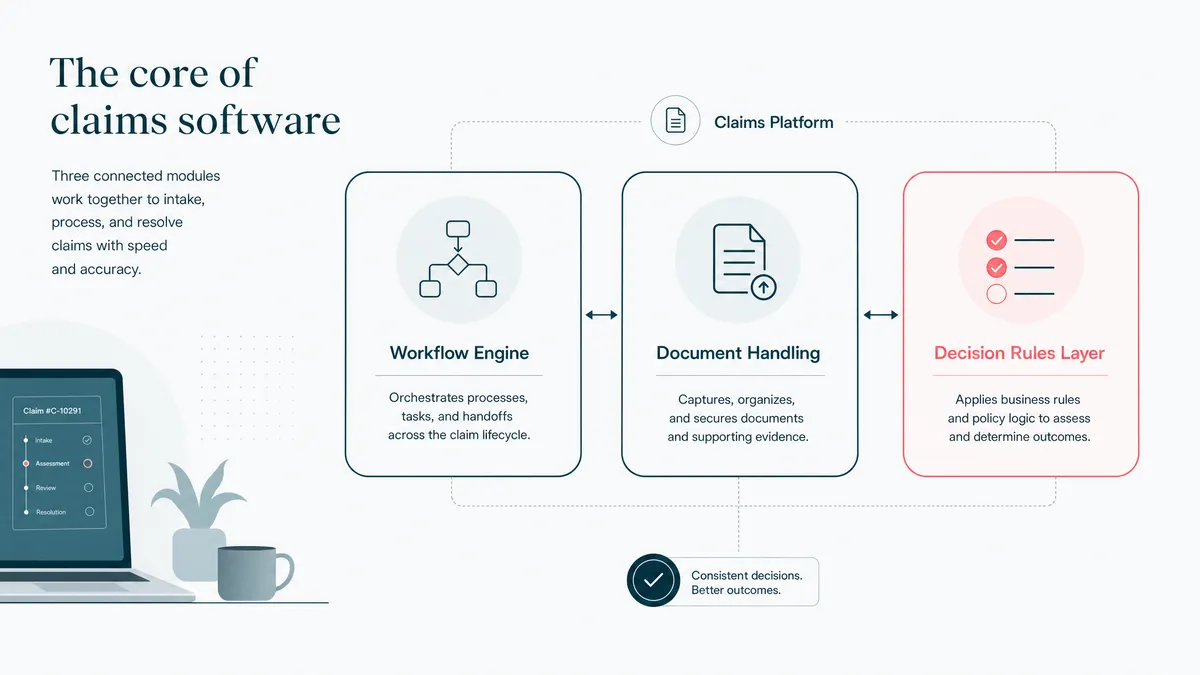
The core features are workflow, documents, and decisions
The basic claims feature list is easy to write. The hard part is making those features behave together.
- First notice of loss intake, with the claim type, policy, customer, and loss details captured cleanly.
- Document upload and classification, because the PDF pile arrives before the process does.
- Assignment and task routing, so adjusters and supervisors see the next useful step.
- Coverage, reserve, and approval workflows, with decisions recorded as structured data.
- Customer and agent status updates, so the phone is not the claims portal.
- Payment handoff and settlement tracking, wired into finance instead of copied manually.
- Reporting and audit logs, because every claim eventually becomes a question.
The best systems make the next step obvious. The worst systems make a senior adjuster remember the process from muscle memory. That works until the senior adjuster is on vacation, which is when software gets its performance review.
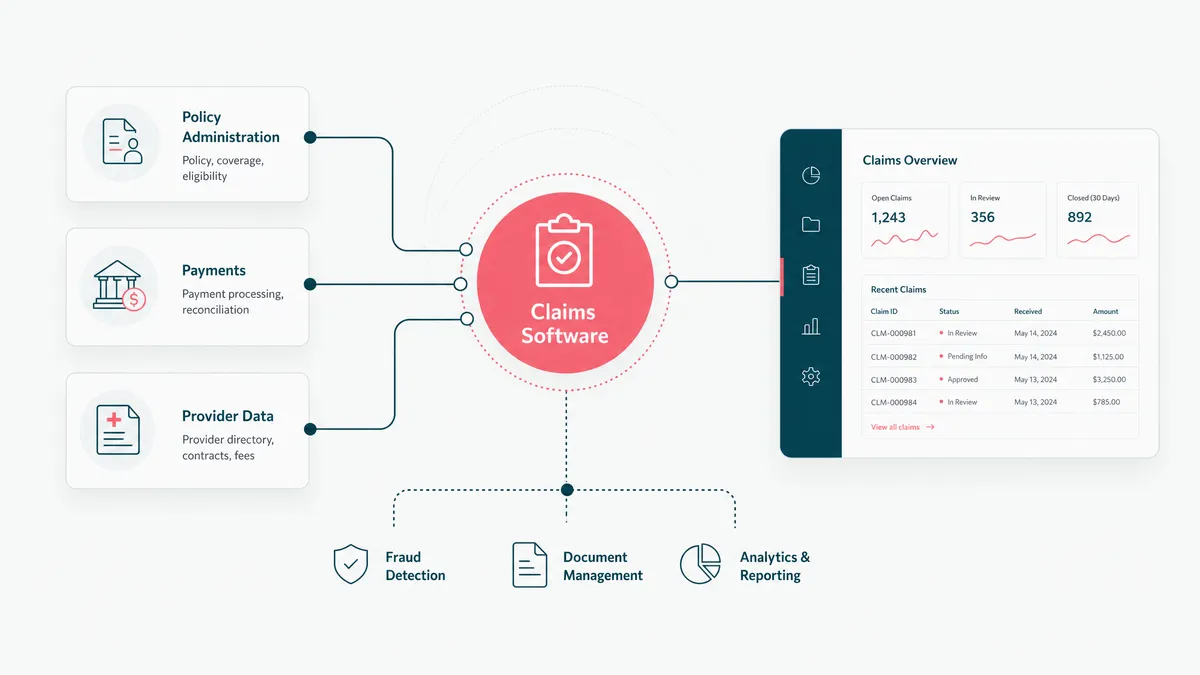
Integrations decide whether the software is useful
Claims software rarely lives alone. It needs the policy admin and management workflow, CRM, document store, payment layer, data warehouse, email or SMS tool, fraud signals, and sometimes external repair or provider networks.
That is why integration is not a later phase. It is the product.
The clean version uses APIs and stable identifiers. The real version often uses old APIs, partial IDs, batch files, vendor-specific exports, and one system that treats a policyholder as a customer while another treats them as three records in a coat. We have synced 23 kinds of record across upstream systems that did not share an ID. That work looks very boring on a roadmap. It is also the part that makes the rest usable. If the vendor APIs are the bottleneck, the work starts to look like custom API development.
For insurance data exchange, ACORD standards are worth knowing before you design the data model. Not because every vendor will follow them beautifully. They will not. But standards give the team a shared language for policies, claims, parties, coverages, and transactions. Shared language is cheaper than interpretive dance with CSVs.
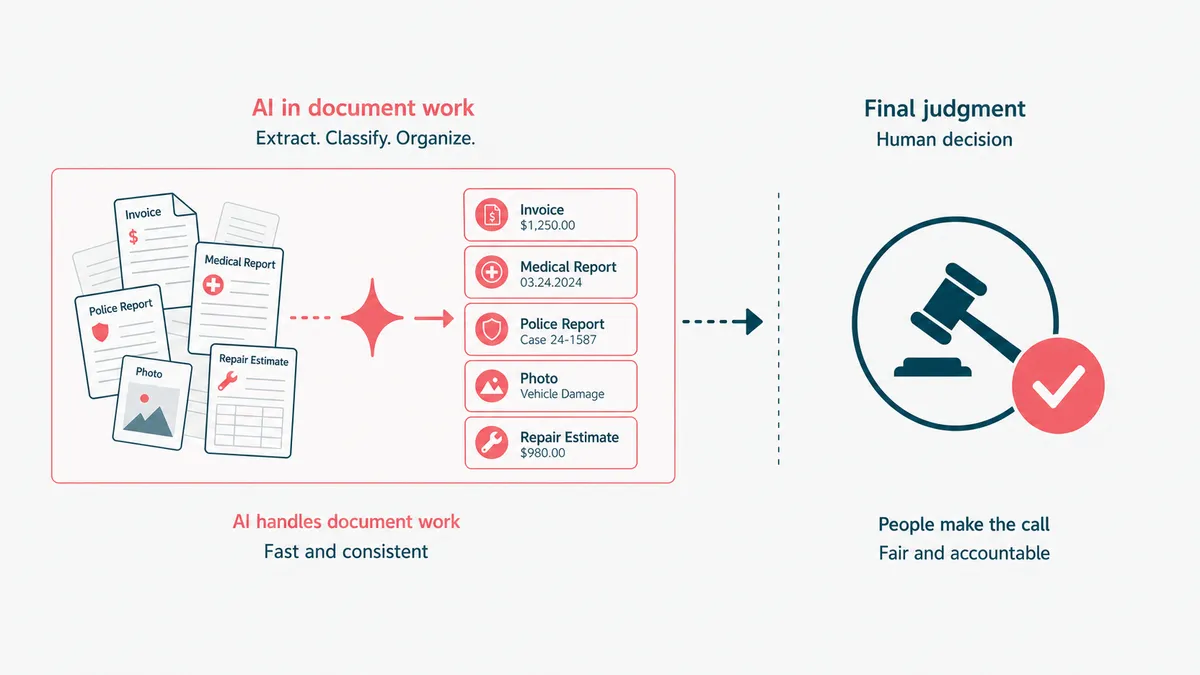
AI belongs in document work, not final judgment
AI can help claims teams a lot. It can read forms, classify documents, extract dates and amounts, summarize long files, draft customer updates, flag missing evidence, and route a claim to the right queue.
That is useful. It is also not the same as letting a model decide a complex claim in the dark.
Claims decisions carry money, fairness, and legal exposure. A model can support the decision, but the system needs a human review path, an explanation trail, and a way to replay what the model saw. We take the same view in healthcare AI: the model can read a lab PDF and turn it into plain language a provider can use, but the provider still owns the clinical judgment. Different domain, same rule: AI helps the expert move faster, not vanish from the workflow.
If your first AI use case is document extraction and claim summarization, good. That is the kind of bounded generative AI development that can earn its keep. If your first use case is "approve everything automatically," take a walk, drink water, and come back when the spreadsheet has stopped whispering.
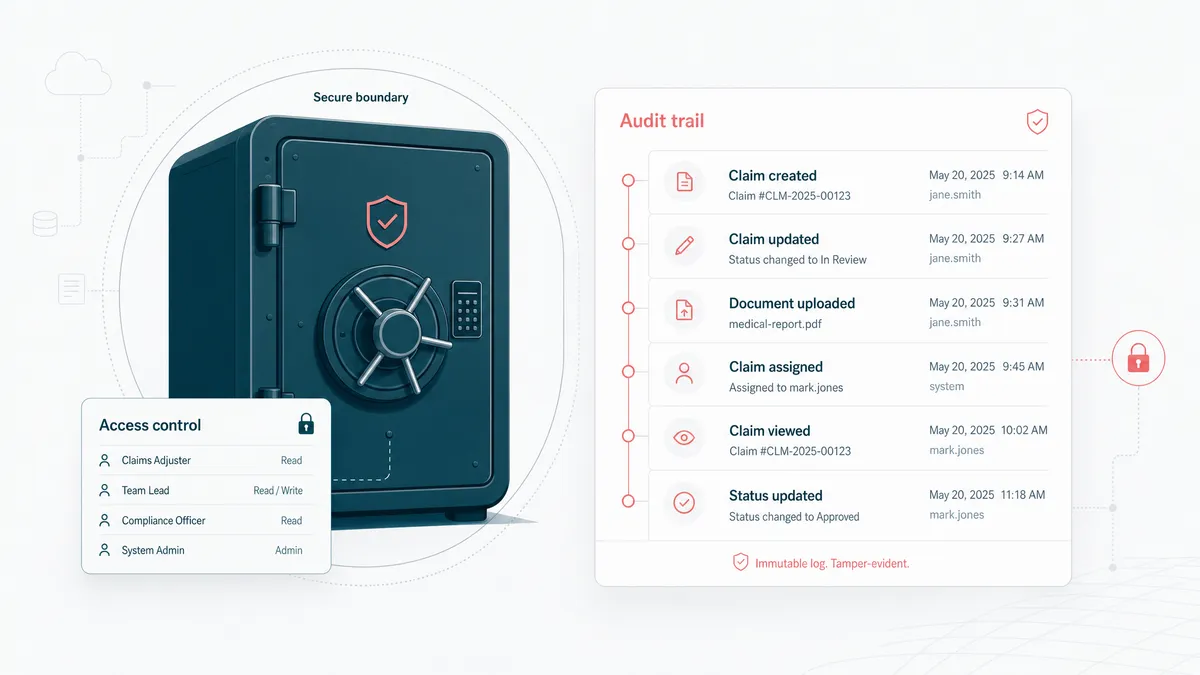
Security and audit trails are part of the feature
Claims data is sensitive by default. It can include policyholder identity, health details, payment data, accident reports, photos, legal correspondence, and documents nobody wants floating around in the wrong inbox.
So the security model is not a bolt-on. It is part of the workflow.
You need role-based access, least-privilege integrations, encrypted storage, audit logs, retention rules, and a clean record of who saw or changed what. The NAIC data privacy and insurance guidance is a useful starting point for the risk posture. For the engineering side, the NIST Cybersecurity Framework gives a practical vocabulary for identifying, protecting, detecting, responding, and recovering.
The dull controls are not bureaucracy. They are how the system survives the day someone asks for proof.
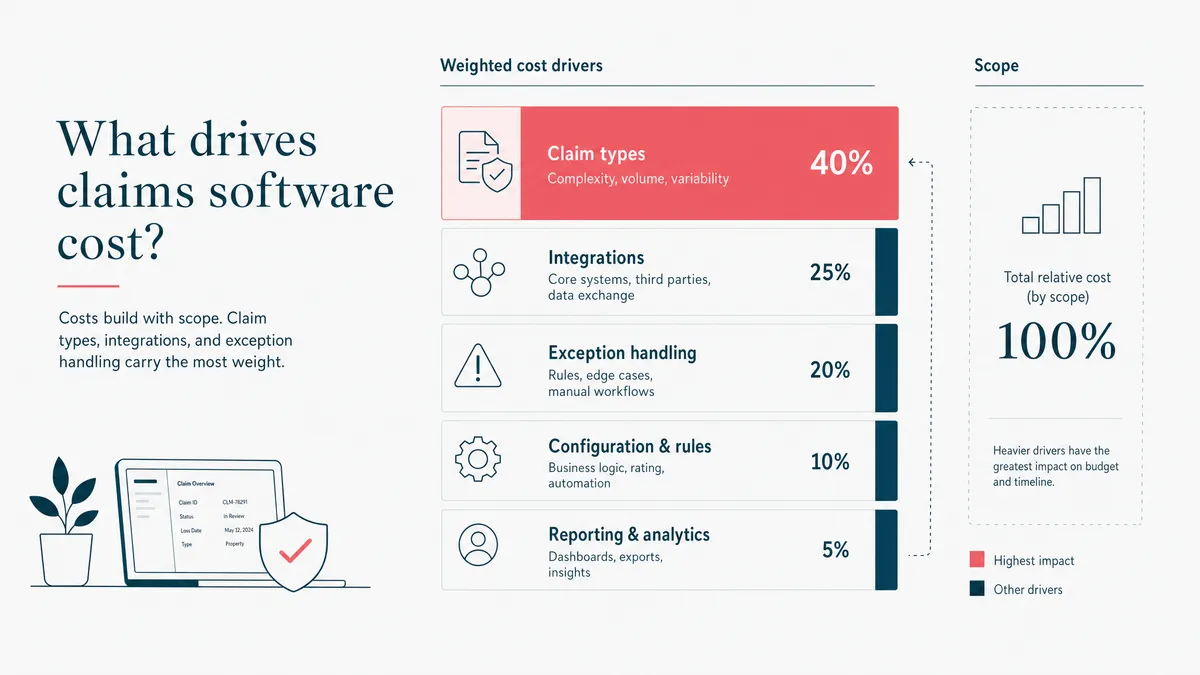
Cost follows claim types, integrations, and exceptions
There is no useful universal price for custom claims management software. A small extension around intake and document routing is one kind of project. A full claims platform with multiple product lines, payment workflows, supervisor approvals, analytics, and external networks is another animal entirely. Same zoo, different cage.
The estimate moves with five things.
- Count the claim types. Auto, property, health, warranty, and specialty claims do not behave the same.
- Map the roles. Customer, agent, adjuster, supervisor, finance, legal, and operations all need different views.
- List the integrations. Policy admin, CRM, payments, document management, data warehouse, and notification systems usually drive the real effort.
- Name the exceptions. Re-opened claims, partial approvals, missing documents, disputed decisions, and duplicate records are where the work hides.
- Decide what ships first. A focused workflow can go live before the full platform. The big-bang version is how budgets learn parkour.
If you send the workflow and systems involved, a serious team should reply with a scoped estimate in 1-2 business days. If they reply with a firm price before asking how claims move today, that is not confidence. That is font-weight.

When not to build claims management software
Do not build custom claims software when a configurable platform fits. Buy the product, configure the workflow, and spend the budget where it actually changes the business.
Also do not build custom just because the current process is annoying. Annoying is not always expensive. Custom earns its cost when the manual work burns time every week, when the integration gaps create errors, when customer experience suffers, or when the operation has outgrown the products around it.
We learned this discipline in regulated workflow work. On a healthcare wellness platform, the custom build made sense because the team needed intake, clinical workflows, AI lab analysis, billing, and audit-ready handling of private data in one product. If an off-the-shelf tool had covered that workflow, we would have told them to buy it. Honest scoping is not charity. It is how you avoid spending six months building software that should have been a subscription.
For claims, the same rule applies. Buy the commodity. Build the workflow that is yours. And if the current process depends on a spreadsheet named Claims_Master_REAL_Final.xlsx, email us before it grows a sequel.